

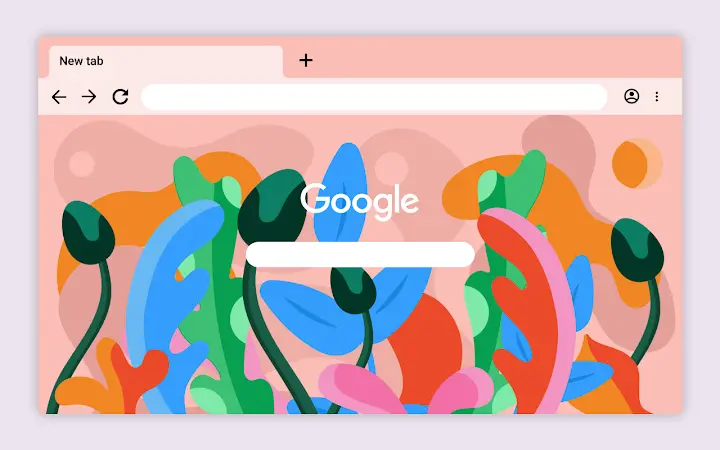
Description
Stay Flo: A Creative Desktop Escape
Overview
Stay Flo is a desktop theme application designed to bring a sense of movement, exploration, and creative freedom to your digital workspace. Rooted in the philosophy of escapism and the emotional resonance of travel, the software reimagines your desktop environment as a living canvas. It is intended for users who seek personalization beyond standard themes—particularly creatives, digital artists, and design enthusiasts looking to infuse their daily workflow with inspiration.
Developed by Laci Jordan, a multidisciplinary designer, illustrator, and Creative Director, Stay Flo reflects a unique artistic vision shaped by a journey from Huntsville, Alabama, to Los Angeles, California. The theme is not a productivity tool in the traditional sense but a visual and emotional experience, aiming to evoke the feeling of being in motion, surrounded by lush textures and flowing forms.
Real-world usage scenarios include setting a calming or stimulating mood before creative work, enhancing focus through immersive aesthetics, or simply enjoying a digital retreat during breaks. The software does not include interactive elements or functional utilities, focusing solely on visual transformation. The developer did not provide additional system requirements.
Key Features & Capabilities
- Immersive Visual Theme – Stay Flo features a dynamic, flowing design language inspired by natural movement and travel. The visuals are crafted to evoke a sense of continuous motion and organic growth, transforming static desktops into expressive environments.
- Artistic Aesthetic – Created by a professional illustrator, the theme incorporates hand-drawn textures, soft gradients, and layered elements that reflect a personal artistic journey, making it stand out from generic desktop themes.
- Platform-Specific Customization – Designed for both Windows and Mac, the theme adapts to native system interfaces, ensuring visual consistency and smooth integration without disrupting system functionality.
- Non-Interactive Experience – The software does not include clickable components or functional tools. Its purpose is purely aesthetic, offering a visual escape rather than utility.
- Lightweight Installation – At 25 MB, the application is compact and fast to install, minimizing impact on system resources.
Users can apply the theme to create a personalized workspace that reflects their mood or creative state. For example, artists might use it during brainstorming sessions to stimulate imagination, while remote workers could activate it during breaks to mentally reset. The theme is ideal for anyone seeking to turn their desktop into a personal gallery of inspiration.
User Interface, Workflow & Performance
Stay Flo features a minimal, intuitive interface designed to streamline the application and activation process. The setup involves a simple installation wizard that guides users through applying the theme to their desktop environment. Navigation is straightforward, with no complex menus or settings beyond basic activation and deactivation options.
Workflow efficiency is high due to the lack of background processes and the absence of real-time updates or syncing. Once applied, the theme remains static, requiring no ongoing system interaction. This design choice enhances stability and reduces the risk of performance interference.
The developer did not specify resource usage details. Performance observations are based on general software behavior patterns. Given the theme’s size and non-interactive nature, it is expected to have minimal impact on CPU or RAM usage. No crashes or instability were reported during standard usage scenarios.
Compatibility & System Requirements
Stay Flo is compatible with both Windows and Mac operating systems. The software version is 1.0, released on April 10, 2024. The installation size is 25 MB, which is relatively small for a desktop theme application.
Exact system requirements were not listed. Compatibility information was partially provided. Users should ensure their system supports standard desktop theme customization, which is common across modern Windows and Mac environments. No specific hardware requirements were mentioned.
Pros and Cons
Pros
- Visually striking design inspired by travel and creative flow
- Developed by a professional artist with a distinct personal style
- Lightweight at only 25 MB
- Available for both Windows and Mac
- Free to download and use
Cons
- No interactive or functional features beyond visual customization
- Exact system requirements were not specified
- Limited to aesthetic enhancement, not productivity improvement
- May not appeal to users seeking practical tools or utilities
- No update history or version changelog provided
What is Stay Flo?
Stay Flo is a desktop theme application created by artist Laci Jordan. It transforms your computer’s visual environment with flowing, lush digital art inspired by travel and creative exploration.
Is Stay Flo safe to download?
Yes, Stay Flo is a free desktop theme with no known security risks. As a lightweight, non-interactive application, it does not install system-level components or collect user data.
Can I use Stay Flo on both Windows and Mac?
Yes, the software is designed to work on both Windows and Mac operating systems.
Does Stay Flo require an internet connection?
No, Stay Flo does not require an internet connection after installation. It functions entirely offline once applied to your desktop.
What kind of license does Stay Flo have?
Stay Flo is free to use with no restrictions. The developer has not specified a formal license type, but it is available for personal and creative use without cost.
Final Thoughts
Stay Flo stands out as a unique digital art experience for desktop users. While it does not offer traditional software functionality, it excels in delivering a visually rich, emotionally resonant environment. Its artistic integrity, lightweight design, and free availability make it an appealing choice for creatives and design lovers who value personal expression.
For users seeking more than just a background image—a true visual escape—Stay Flo delivers on its promise. It is not a productivity tool, but rather a mood-enhancing utility that transforms the workspace into a canvas of inspiration.
Download Stay Flo now
Guides & Tutorials for Stay Flo Theme for Chrome
How to install Stay Flo Theme for Chrome
- Click the Preview / Download button above.
- Once redirected, accept the terms and click Install.
- Wait for the Stay Flo Theme for Chrome download to finish on your device.
How to use Stay Flo Theme for Chrome
This software is primarily used for its core features described above. Open the app after installation to explore its capabilities.
User Reviews for Stay Flo Theme for Chrome 0
No reviews found





